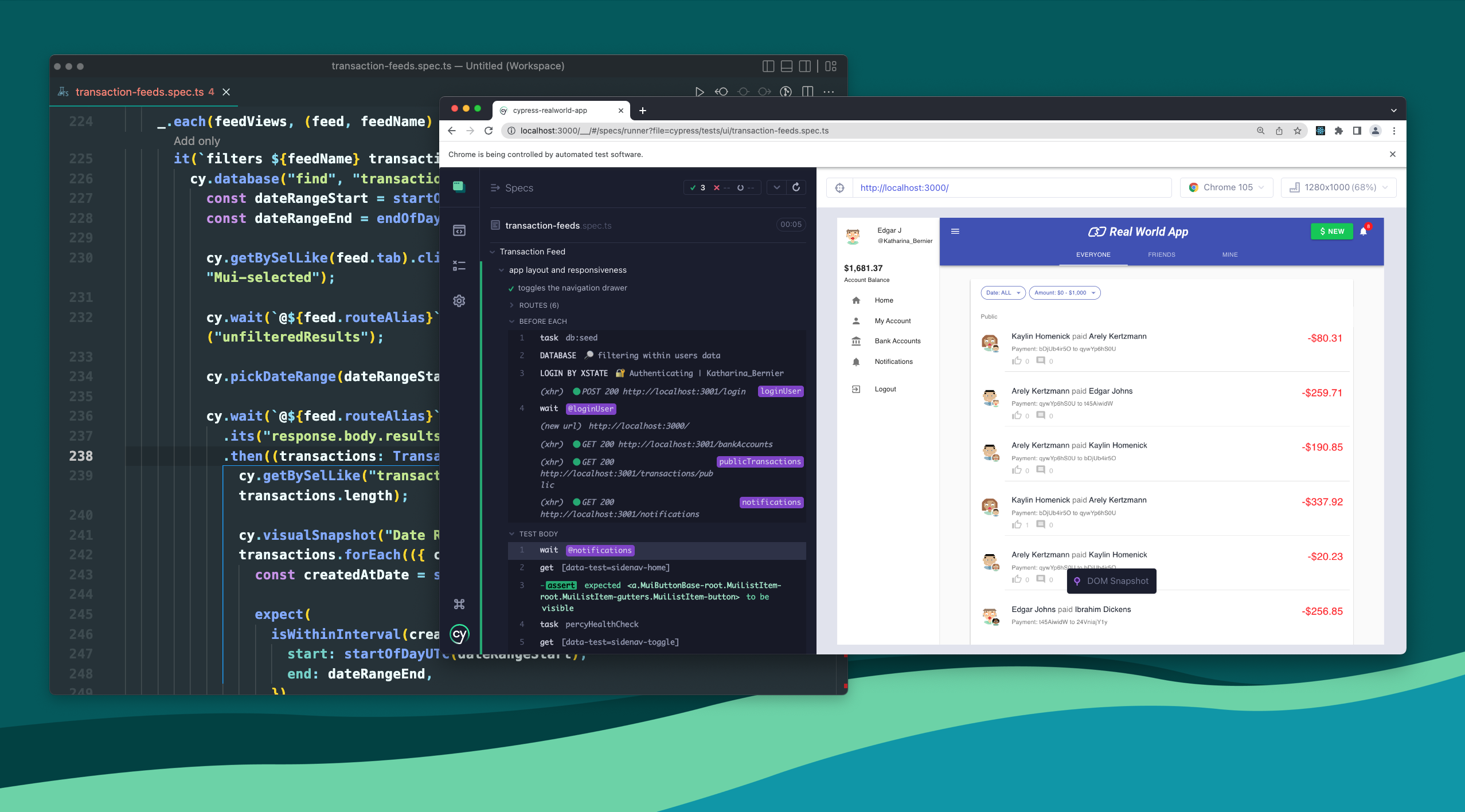
Cypress is a next generation front end testing tool built for the modern web. We address the key pain points teams face when testing modern applications and maintaining test suites. Cypress is a next generation front end testing tool built for the modern web. We address the key pain points teams face when testing modern applications and maintaining test suites.
Our users are typically developers, QA engineers, and teams looking to build web applications and increase the quality of their existing applications.
Cypress provides solutions for:
Cypress can test anything that runs in a browser and surface insights into how to improve the health of your test suite and the quality of your application.
Products
- Cypress App, a free, open source, locally installed app for writing and running tests.
- Cypress Cloud, a paid service for recording tests, surfacing test results, and providing test analytics.
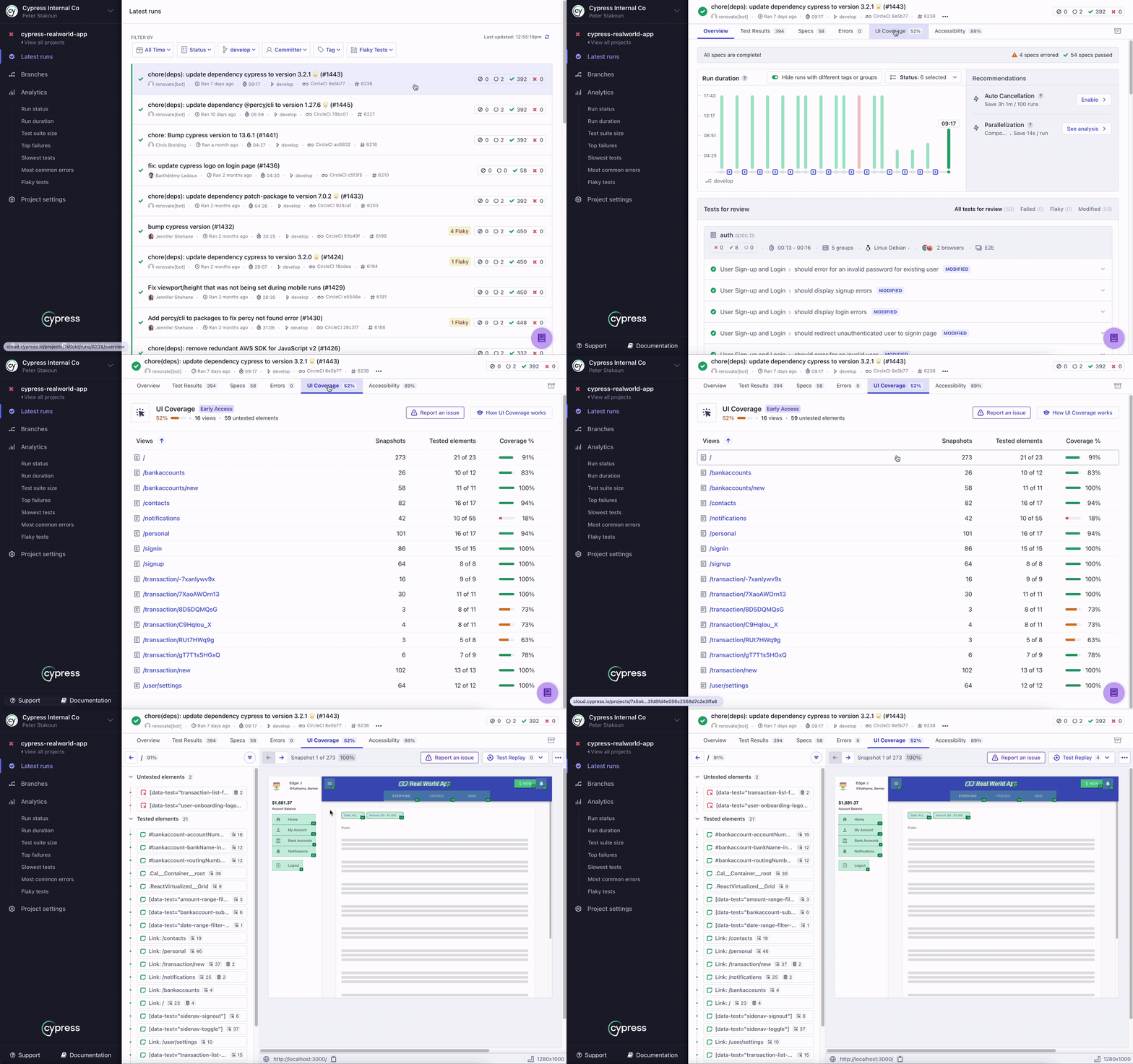
- UI Coverage, a premium solution providing a visual overview of test coverage across every page and component of your app, offering clear insights into uncovered areas that everyone can understand.
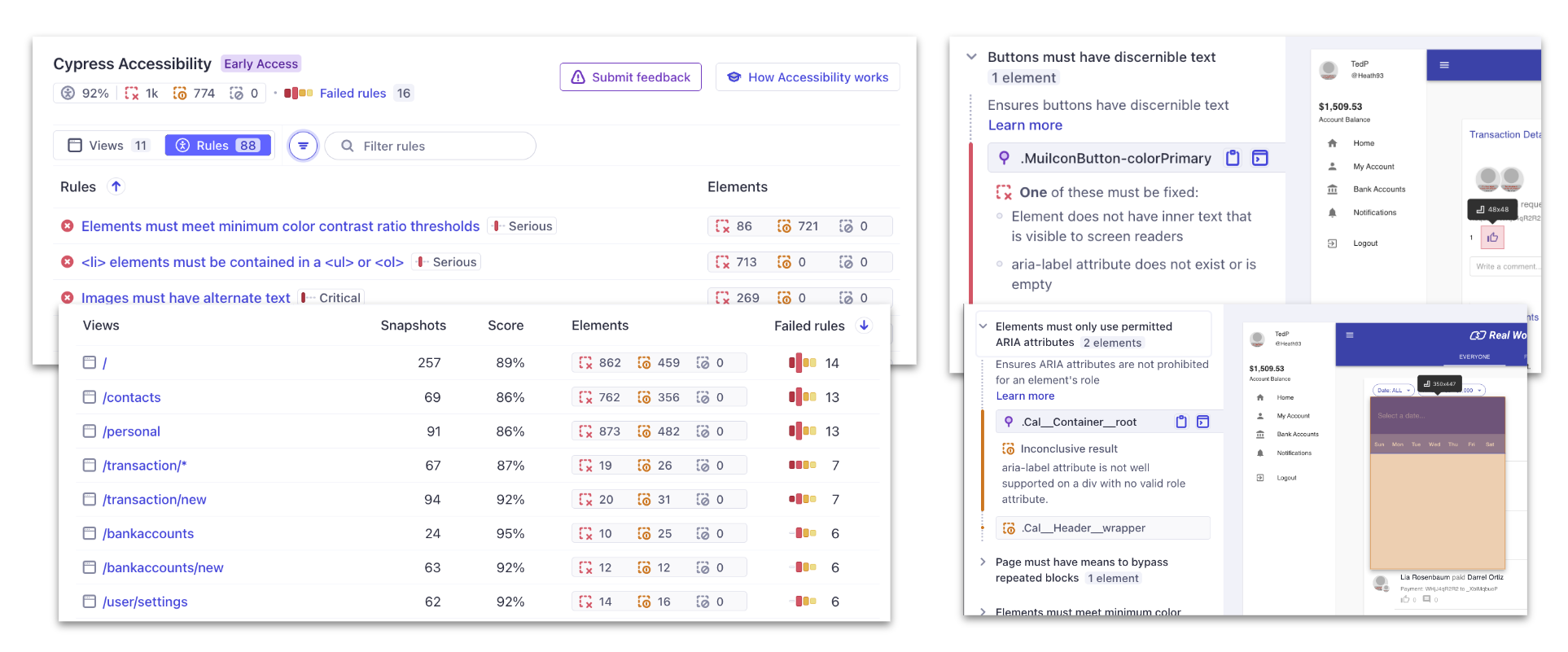
- Cypress Accessibility, a premium solution providing accessibility checks, which helps detect barriers for people with disabilities using your application.
Cypress is a robust solution that can improve the quality of your application.
- First: Cypress helps you set up and start writing tests every day while you build your application locally. Test Driven Development at its best!
- Next: After building up a suite of tests and integrating Cypress with your CI Provider, Cypress Cloud can record your test runs surfacing exactly what happened during the test in Test Replay. You’ll never have to wonder: Why did this fail?
- Finally: Add on Cypress Accessibility to get continuous feedback on accessibility issues and regressions, and UI Coverage to ensure you’ve tested every part of your application.
Features
Below are listed some of the key features of each product.
Cypress App
- Time Travel: Cypress takes snapshots as your tests run. Hover over commands in the Command Log to see exactly what happened at each step.
- Debuggability: Stop guessing why your tests are failing. Debug directly from familiar tools like Developer Tools. Our readable errors and stack traces make debugging lightning fast.
- Automatic Waiting: Never add waits or sleeps to your tests. Cypress automatically waits for commands and assertions before moving on. No more async hell.
- Spies, Stubs, and Clocks: Verify and control the behavior of functions, server responses, or timers. The same functionality you love from unit testing is right at your fingertips.
- Network Traffic Control: Easily control, stub, and test edge cases without involving your server. You can stub network traffic however you like.
- Consistent Results: Our architecture doesn’t use Selenium or WebDriver. Say hello to fast, consistent and reliable tests that are flake-free.
- Cross Browser Testing: Run tests within Firefox and Chrome-family browsers (including Edge and Electron) locally and in a Continuous Integration pipeline.
Cypress Cloud
- Test Replay: Record to Cypress Cloud and replay the test exactly as it executed during the run for zero-configuration debugging using Test Replay.
- Smart Orchestration: Once you’re set up to record to Cypress Cloud, easily parallelize your test suite, rerun failed specs first with Spec Prioritization, and cancel test runs on failures with Auto Cancellation for tight feedback loops.
- Flake Detection: Discover and diagnose unreliable tests with Cypress Cloud’s Flaky test management.
- Branch Review: Quickly identify the impact a pull request might have on your test suite in a single view using Branch Review. Compare which tests are failing, flaky, pending, added, or modified between the source and base branches and prevent the merging of low-quality code.
- Integrations: Integrate with GitHub, GitLab, or Bitbucket to see test results directly on every push or pull request. Cypress Cloud also integrates with Slack, Jira, and Microsoft Teams to keep your team in the loop.
- Test Analytics: Track test results over time with Test Analytics to identify trends, regressions, and improvements in your test suite. Use our Data Extract API to extract the data that is important to your team.
UI Coverage
- Visualize Coverage: UI Coverage provides a visual overview of test coverage across every page and component of your app, offering clear insights into uncovered areas that everyone can understand.
- Results API: Use the UI Coverage Results API to programmatically access test coverage data and integrate it into your existing workflows.
- Branch Review: Compare runs to see newly introduced elements in your application or unexpected reductions in test coverage.
Cypress Accessibility
- Accessibility Checks: Maximize the value of your existing Cypress tests by instantly adding thousands of accessibility checks with no setup, code changes, or performance penalty.
- Run-level reports: Get a detailed report of accessibility issues found in your test runs with Run-level reports.
- Results API: Use the Cypress Accessibility’s Results API to programmatically access Accessibility results in a CI environment.
- Branch Review: Compare any report against a baseline to review only the new violations, without any noise from existing issues.
Solutions
Cypress can be used to ensure several different types of test. This can provide even more confidence that your application under test is working as intended and accessible to all users.
End-to-end Testing
Cypress was originally designed to run end-to-end (E2E) tests on anything that runs in a browser. A typical E2E test visits the application in a browser and performs actions via the UI just like a real user would.
it('adds todos', () => {
  cy.visit('https://example.cypress.io/')
  cy.get('[data-cy="new-todo"]').type('write tests{enter}')
  // confirm the application is showing one item
  cy.get('[data-cy="todos"]').should('have.length', 1)
})
Component Testing
Cypress Component Testing provides a component workbench for you to quickly build and test components from multiple front-end UI libraries — no matter how simple or complex.
Learn more about how to test components for React, Angular, Vue, and Svelte.
- React
- Angular
- Vue
- Svelte
import Button from './Button'

it('uses custom text for the button label', () => {
  cy.mount(<Button>Click me!</Button>)
  // Assert that a button component has the correct text
  cy.get('button').should('contains.text', 'Click me!')
})
Accessibility Testing
You can write Cypress tests to check the accessibility of your application, and use plugins to run broad accessibility scans. When combined with Cypress Accessibility in Cypress Cloud, insights can be surfaced when specific accessibility standards are not met through your testing – with no configuration required. See our Accessibility Testing guide for more details.
it('adds todos', () => {
  cy.visit('https://example.cypress.io/')
  cy.get('img#logo')
    // Assert that an image has the correct alt text
    .should('have.attr', 'alt', 'Cypress Logo')
})
UI Coverage
You can increase release confidence by closing testing gaps in critical app flows using UI Coverage. Leverage data-driven insights to cover untested areas, reduce incidents, and improve app quality.
Other
Cypress can perform arbitrary HTTP calls, thus you can use it for API testing.
it('adds a todo', () => {
  cy.request('POST', '/todos', { title: 'Write API Tests' })
    .its('body')
    .should('contain', { title: 'Write API Tests' })
})
And through a large number of official and 3rd party plugins you can write many other types of tests!
Our mission
Our mission is to build a thriving testing solution that enhances productivity, makes testing an enjoyable experience, and generates developer happiness. We hold ourselves accountable to champion a testing process that actually works.
We believe our documentation should be approachable. This means enabling our readers to understand fully not just the what but the why as well.
We want to help developers build a new generation of modern applications faster, better, and without the stress and anxiety associated with managing tests. We aim to elevate the art of software development by leveraging test results to generate actionable insights for long-term stability by proactively identifying areas for improvement.
We know that in order for us to be successful we must enable, nurture, and foster an ecosystem that thrives on open source. Every line of test code is an investment in your codebase, it will never be coupled to us as a paid service or company. Tests will be able to run and work independently, always.
We believe testing needs a lot of ❤️ and we are here to build a tool, a service, and a community that everyone can learn and benefit from. We’re solving the hardest pain points shared by every developer working on the web. We believe in this mission and hope that you will join us to make Cypress a lasting ecosystem that makes everyone happy.
Key Differences
Architecture
Most testing tools (like Selenium) operate by running outside of the browser and executing remote commands across the network. Cypress is the exact opposite. Cypress is executed in the same run loop as your application.
Behind Cypress is a Node server process. Cypress and the Node process constantly communicate, synchronize, and perform tasks on behalf of each other. Having access to both parts (front and back) gives us the ability to respond to your application’s events in real time, while at the same time work outside of the browser for tasks that require a higher privilege.
Cypress ultimately controls the entire automation process from top to bottom, which puts it in the unique position of being able to understand everything happening in and outside of the browser. This means Cypress is capable of delivering more consistent results than any other testing tool.
Because Cypress is installed locally on your machine, it can additionally tap into the operating system for automation tasks. This makes performing tasks such as taking screenshots, recording videos, general file system operations and network operations possible.
Native access
Because Cypress operates within your application, that means it has native access to every single object. Whether it is the window, the document, a DOM element, your application instance, a function, a timer, a service worker, or anything else – you have access to it in your Cypress tests.
For instance you can:
- Stub the browser or your application’s functions and force them to behave as needed in your test case.
- Expose data stores so you can programmatically alter the state of your application directly from your test code.
- Test edge cases like ’empty views’ by forcing your server to send empty responses.
- Test how your application responds to errors on your server by modifying response status codes to be 500.
- Modify DOM elements directly – like forcing hidden elements to be shown.
- Use 3rd party plugins programmatically. Instead of fussing with complex UI widgets like multi selects, autocompletes, drop downs, tree views or calendars, you can call methods directly from your test code to control them.
- Prevent Google Analytics from loading before any of your application code executes when testing.
- Get synchronous notifications whenever your application transitions to a new page or when it begins to unload.
- Control time by moving forward or backward so that timers or polls automatically fire without having to wait for the required time in your tests.
- Add your own event listeners to respond to your application. You could update your application code to behave differently when under tests in Cypress. You can control WebSocket messages from within Cypress, conditionally load 3rd party scripts, or call functions directly on your application.
- For Component Tests, Cypress is browser-based, allowing you to test not only your component’s functionality but also styles and appearance. You can visually see your component in action and interact with it in the app.
Shortcuts
Cypress allows for browser context to be cached with cy.session(). This means as a user, you only need to perform authentication once for the entirety of your test suite, and restore the saved session between each test. That means you do not have to visit a login page, type in a username and password and wait for the page to load and/or redirect for every test you run. You can accomplish this once with cy.session() and if needed, cy.origin().
Flake resistant
Cypress knows and understands everything that happens in your application synchronously. It is notified the moment the page loads and the moment the page unloads. Cypress even knows how fast an element is animating and will wait for it to stop animating. Additionally, it automatically waits for elements to become visible, to become enabled, and to stop being covered. When pages begin to transition, Cypress will pause command execution until the following page is fully loaded. You can also tell Cypress to wait on specific network requests to finish.
Debuggability
Above all else Cypress is built for usability.
- There are hundreds of custom error messages describing the exact reason Cypress failed your test.
- There is a rich UI which visually shows you the command execution, assertions, network requests, spies, stubs, page loads, or URL changes.
- The Cypress App takes snapshots of your application and enables you to time travel back to the state it was in when commands ran.
- You can use the Developer Tools while your tests run to see every console message or network request. You can inspect elements and use debugger statements in your spec or application code – you can use all the tools you’re already comfortable with. This enables you to test and develop all at the same time.
Trade offs
While there are many new and powerful capabilities of Cypress – there are also important trade-offs that we’ve made in making this possible.
If you’re interested in understanding more, we’ve written an entire guide on this topic.
Get Started
Install Cypress so you can quickly see your first passing test within minutes for End-to-end tests or Component tests.
Cypress in the Real World